The Battlefield 6 directx error is one of the most frustrating issues players encounter when trying to launch or play the game. Instead of jumping into intense battles, many users face crashes, freezes, or sudden shutdowns right at startup.
The Battlefield 6 directx error is one of the most frustrating issues players face, and this guide will help you understand why this happens and how to fix it step by step. In most cases, the Battlefield 6 directx error is related to system compatibility, outdated drivers, or unstable game files. Fortunately, there are several proven solutions that can restore smooth gameplay quickly when dealing with the Battlefield 6 directx error.
The Battlefield 6 directx error is not always caused by the game itself, but often by your system configuration. Let’s break it down clearly so you can fix it without guesswork.
What is Battlefield 6 DirectX Error?
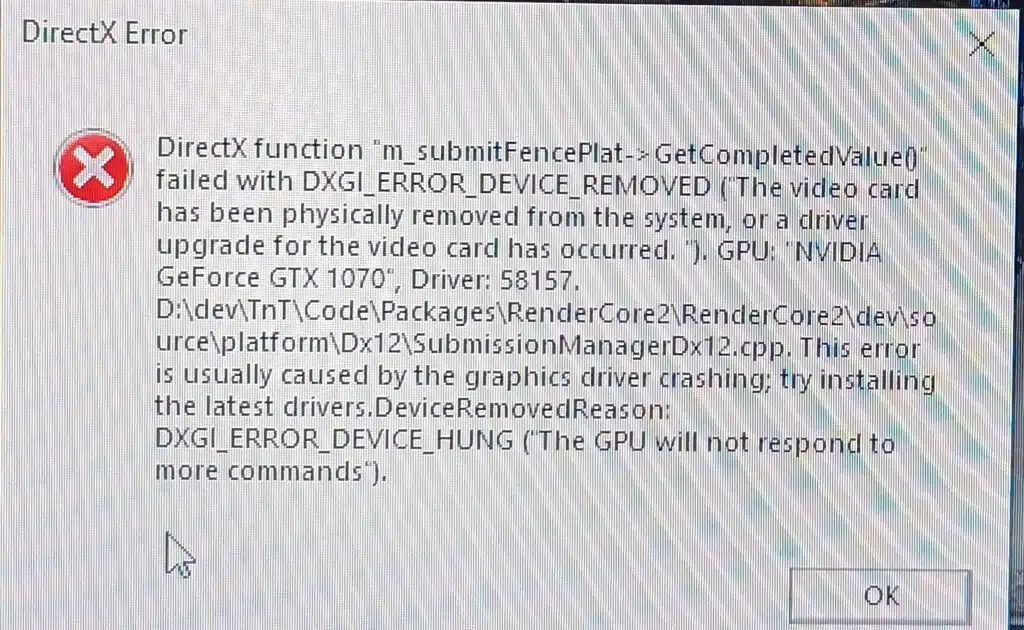
The Battlefield 6 directx error is a technical issue that occurs when the game fails to properly communicate with your GPU through DirectX, the core graphics technology responsible for rendering visuals in Windows-based games.
When this communication breaks, the game cannot process graphics correctly, leading to crashes, freezes, or failure to launch. In many cases, players experience the issue right at startup, before even entering the main menu.
Understanding this error is the first step to fixing it, because it helps you identify whether the problem comes from your system, your drivers, or the game itself.
Why does Battlefield 6 DirectX Error happen?
The directx error Battlefield 6 is usually not caused by a single factor. Instead, it comes from a combination of system, software, and hardware conditions that affect how DirectX interacts with your GPU.
Common technical causes
Several issues can trigger the error, including:
- Outdated or corrupted GPU drivers;
- Missing or damaged DirectX components;
- Incompatible graphics settings inside the game;
- Overclocking instability on GPU or CPU;
- Corrupted or incomplete game installation files.
Each of these issues can interrupt the rendering process, making the game unable to initialize properly.
System-level conflicts
In addition to drivers and files, system conflicts also play a significant role:
- Background applications consuming excessive memory;
- Overlays interfering with rendering such as Discord, Steam, or NVIDIA tools;
- Windows updates that alter graphics behavior;
- Antivirus software blocking game processes.
As a result, the system may fail to maintain stable communication between the game engine and DirectX.
What Battlefield 6 DirectX Error looks like in-game
The BF6 directx error can appear in different ways depending on the severity of the issue. Some players experience immediate crashes, while others notice instability during gameplay.
Most common symptoms
Players frequently report:
- Game crashes during startup or loading screen;
- Black screen before entering the menu;
- DirectX-related error messages;
- Sudden freezing during matches;
- FPS drops followed by shutdown.
How to recognize the pattern
In many cases, the issue follows a clear sequence:
- The game starts normally;
- The loading screen appears;
- The system freezes or crashes;
- A DirectX-related error message appears.
In simple terms, the BF6 directx error is a breakdown in communication between the game engine and the graphics processing system, preventing stable rendering.
Battlefield 6 DirectX Error main causes and system impact
The Battlefield 6 directx error can originate from multiple technical layers of your system. Understanding these layers helps you apply the correct fix instead of guessing.
GPU and driver issues
Graphics drivers are one of the most common causes of the error, especially when outdated or improperly installed.
Drivers act as a bridge between your GPU and DirectX. When they fail, the game cannot render properly.
Common driver-related problems include:
- Old drivers breaking DirectX compatibility;
- Beta drivers introducing instability;
- Failed installations leaving missing files;
- Conflicts between different driver versions.
Even updated drivers can still cause issues if they were installed over corrupted versions or if Windows replaced components automatically.
System overload and background applications
Sometimes the direct x error BF6 is not directly caused by DirectX itself, but by system pressure.
When the system is overloaded:
- CPU cannot process instructions in time;
- RAM becomes insufficient for textures and assets;
- GPU struggles to maintain stable frame delivery.
Background applications also contribute to instability, especially overlays such as Discord, Steam, or recording software. These tools compete for GPU resources and may trigger crashes.
Game file corruption and hardware instability
Another major source of the BF6 directx error is corrupted data or unstable hardware behavior.
Corrupted game files may cause:
- DirectX error messages;
- Loading failures;
- Texture glitches;
- Infinite loading screens.
Hardware-related issues include:
- Overclocked GPU or CPU beyond stable limits;
- Weak or failing power supply;
- Overheating components during gameplay.
These conditions directly affect how DirectX processes rendering tasks.
How to fix Battlefield 6 DirectX Error step by step
The following solutions address the most common causes of the Battlefield 6 directx error.
Step 1: Update GPU drivers correctly
Start with the graphics drivers, as they are the foundation of DirectX stability.
- NVIDIA users should update via GeForce Experience;
- AMD users should use Adrenalin software.
If issues persist, perform a clean installation instead of an overwrite.
Step 2: Repair game files
Corrupted files are a frequent cause of errors.
- Open EA App or Steam;
- Select Battlefield 6;
- Click on “Repair” or “Verify files”.
This process restores missing or damaged files automatically.
Step 3: Install DirectX and dependencies
Ensure your system is fully updated:
- DirectX 12 or latest supported version;
- Visual C++ Redistributables;
- Latest Windows updates.
These components are essential for stable game rendering.
Step 4: Disable overlays
Turn off all overlays before launching the game:
- Discord overlay;
- Steam overlay;
- NVIDIA overlay.
These are known triggers for the directx error Battlefield 6.
Step 5: Run as administrator
Right-click the game and select “Run as administrator” to ensure full system access and avoid permission-related crashes.
Advanced Battlefield 6 DirectX Error fixes for persistent crashes
If the BF6 directx error continues, deeper system adjustments may be required.
Clean GPU driver reinstall (DDU method)
A clean driver reset can eliminate hidden conflicts:
- Remove all GPU drivers using DDU;
- Restart in safe mode;
- Install the latest stable driver version.
Lower graphics settings
Reducing GPU load can improve stability:
- Disable Ray Tracing;
- Lower texture quality;
- Turn off V-Sync.
Check system temperatures
Overheating is a common cause of the BF6 hang detected issue. Symptoms include freezing, crashes, and DirectX failures during extended sessions. Proper cooling and airflow are essential.
Battlefield 6 DirectX Errorcomparison table (causes vs fixes)
| Problem Source | Symptom | Recommended Fix |
| GPU Drivers | Crash on startup | Update or reinstall drivers |
| Corrupted Files | Loading freeze | Repair game files |
| Overheating | BF6 hang detected | Improve cooling |
| DirectX Missing | Error message | Install DirectX |
| Overlays | Random crash | Disable overlays |
This table helps quickly match symptoms with the appropriate solution.
Preventing Battlefield 6 DirectX Error in the future
After fixing the issue, prevention becomes essential to avoid recurrence of the Battlefield 6 directx error.
Best long-term practices
- Keep GPU drivers updated regularly;
- Avoid unstable overclocking;
- Close unnecessary background applications;
- Maintain proper cooling system performance.
Stable gaming habits
- Restart the PC before long gaming sessions;
- Keep Windows updated;
- Monitor GPU and CPU usage during gameplay.
Battlefield 6 DirectX Error and performance stability tips
Even after fixing the error, system optimization improves long-term stability.
System optimization settings
- Enable Windows Game Mode;
- Set power plan to High Performance;
- Disable unnecessary startup programs.
Network stability considerations
Although this is primarily a graphical issue, unstable connections can indirectly impact gameplay stability.
Tools like ExitLag help optimize routing and reduce network instability, contributing to smoother and more consistent gameplay performance in Battlefield 6.
FAQ
Usually outdated drivers, corrupted files, or DirectX incompatibility.
Update GPU drivers and verify game files first.
It is a crash caused by system overload or instability during gameplay.
Yes, with proper drivers, stable system settings, and updated DirectX.
Yes, especially if game files are corrupted.
Fix Battlefield 6 DirectX Error and Play Smoothly with ExitLag
The Battlefield 6 directx error can be frustrating, but in most cases, it is fully fixable with the right steps. From updating drivers to optimizing system performance, each solution helps restore stability and prevent crashes.
The Battlefield 6 directx error should not stop you from enjoying the game, and with consistent maintenance, you can keep your system running smoothly and avoid future issues.
If you want an extra layer of stability in your gaming experience, ExitLag helps optimize your connection routes, reduce instability, and keep your gameplay as smooth as possible during intense matches.
Try ExitLag and experience more stable gameplay in Battlefield 6 today!
Got questions or want to connect with other players? Join the conversation at the ExitLag Forum!